Employee onboarding is one of the most important business processes within any organization, yet it is often managed through a patchwork of disconnected systems, emails, spreadsheets, and manual follow-up. Human Resources may be responsible for collecting employee information and documents, IT may need to provision accounts and equipment, managers may need to schedule training and introductions, and other departments may have their own onboarding responsibilities as well. Without a centralized system, it becomes difficult to ensure that every task is completed on time and that nothing falls through the cracks.
Many organizations struggle with common onboarding challenges. A new employee arrives on their first day only to discover that no laptop has been ordered. User accounts have not been created. Required paperwork is still missing. Training sessions have not been scheduled. Managers spend valuable time sending reminder emails and tracking progress manually. These issues not only create frustration for employees and managers but also result in lost productivity during a critical period when new hires are forming their first impressions of the organization.
The good news is that these problems can be solved without expensive custom development projects. SharePoint provides an ideal platform for managing onboarding processes, and Infowise Ultimate Forms extends SharePoint with powerful no-code automation, forms, workflow, reporting, and dashboard capabilities that make it possible to build a complete onboarding solution quickly and efficiently.
Create a Structured Employee Onboarding Process
One of the biggest challenges in onboarding is ensuring that every employee follows a consistent process. When tasks are managed through email chains or informal communication, important steps can easily be overlooked.
With Ultimate Forms, organizations can create a structured onboarding workflow directly within SharePoint. Every new employee can be entered into a centralized onboarding system that automatically launches the required activities and tracks progress from start to finish.
Instead of relying on memory or manual coordination, onboarding becomes a repeatable business process with clearly defined steps, responsibilities, deadlines, and accountability. HR, IT, managers, and other departments all work from the same system and have visibility into what has been completed and what still requires attention.
Assign and Track Tasks Across Multiple Departments
Employee onboarding often involves numerous departments working together. HR may need to collect tax forms and employment agreements. IT must create accounts, configure devices, and assign software licenses. Facilities may need to prepare workspace access. Managers may need to assign training and introduce team members.
Ultimate Forms makes it easy to create and assign onboarding tasks automatically. As soon as a new employee record is created, tasks can be generated and routed to the appropriate individuals or teams.
Each task can include due dates, instructions, status tracking, and automated reminders. Team members can update task progress directly within SharePoint, giving everyone involved a clear view of onboarding status without requiring constant follow-up emails or meetings.
Manage Equipment Requests and Account Provisioning
Providing employees with the tools they need to succeed should happen before their first day, yet this is one of the most common onboarding failures.
A well-designed onboarding process can automatically generate requests for laptops, monitors, mobile devices, security badges, software licenses, and system accounts. IT personnel can receive notifications when new tasks are assigned and can update completion status as work progresses.
Because all activities are tracked centrally, managers can immediately see whether equipment has been ordered, delivered, or configured. This eliminates uncertainty and reduces the risk of employees arriving without the resources they need.
Collect Employee Information Through User-Friendly Forms
Many onboarding processes require collecting a significant amount of information from new employees. Personal details, emergency contacts, tax information, direct deposit details, policy acknowledgements, and other documentation must often be gathered and stored.
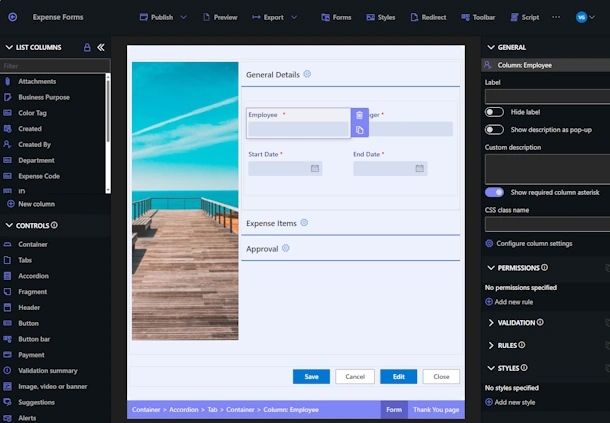
Ultimate Forms allows organizations to create modern, user-friendly forms directly within SharePoint without writing code. Forms can be customized to display only relevant fields, enforce validation rules, and guide users through the information collection process.
This improves data quality while creating a more professional onboarding experience. Employees can easily provide the information needed while HR benefits from having all data stored in a centralized and organized location.
Automate Notifications, Reminders, and Approvals
One of the largest sources of inefficiency in onboarding is manual follow-up. Managers frequently find themselves sending emails asking whether tasks have been completed or reminding departments about upcoming deadlines.
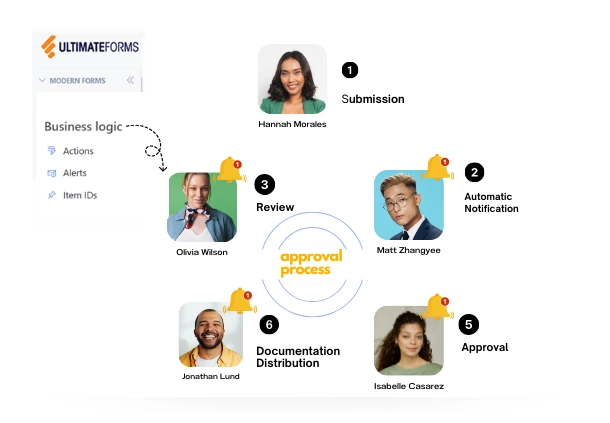
Ultimate Forms eliminates much of this manual effort through automation. Notifications can be sent automatically when tasks are assigned, completed, or overdue. Reminder emails can be generated at scheduled intervals to ensure deadlines are not missed.
Approval processes can also be automated. Equipment purchases, access requests, training approvals, and other onboarding activities can be routed to the appropriate approvers with a complete audit trail of decisions and actions.
By automating communication, organizations reduce administrative overhead while improving accountability throughout the onboarding process.
Monitor Progress with Dashboards and KPI Indicators
Visibility is critical for successful onboarding. Leadership, HR staff, and managers need to understand where employees are in the process and identify bottlenecks before they become problems.
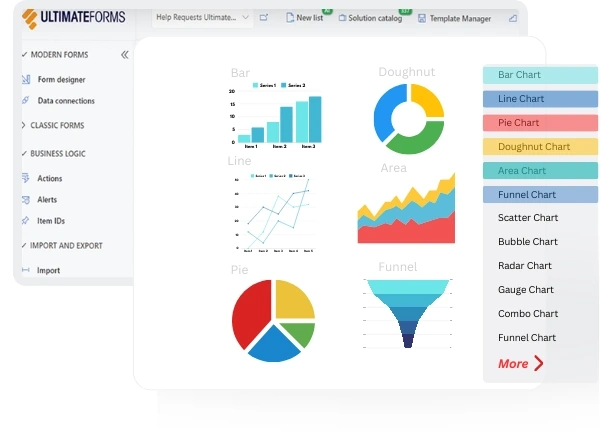
Ultimate Forms provides dashboards, KPI indicators, rollups, and reporting tools that make onboarding status visible at a glance. Managers can quickly identify overdue tasks, incomplete activities, pending approvals, and onboarding milestones.
Rather than searching through spreadsheets or sending status emails, stakeholders can access real-time information directly from SharePoint dashboards. This visibility enables faster decision-making and helps ensure that onboarding stays on schedule.
Reduce Spreadsheet-Based Tracking
Many organizations still rely on spreadsheets to manage onboarding activities. While spreadsheets may seem convenient initially, they quickly become difficult to maintain as onboarding volume increases.
Spreadsheets often contain outdated information, require manual updates, and provide limited visibility into task ownership and status. They also make it difficult to automate notifications and reporting.
A SharePoint-based onboarding solution built with Ultimate Forms replaces spreadsheet tracking with a centralized system that provides real-time information, automated workflows, and complete process visibility. This reduces administrative effort while significantly improving accuracy and accountability.
No-Code Solution for SharePoint
Perhaps the most attractive aspect of Ultimate Forms is that the entire onboarding solution can be built without custom development. Organizations do not need specialized programming skills or lengthy development projects to implement a powerful onboarding system.
Using visual designers, forms, workflows, dashboards, and automation tools, SharePoint administrators and power users can build sophisticated onboarding solutions that meet their organization's specific requirements.
This approach dramatically reduces implementation time while making it easier to maintain and enhance the solution as business needs evolve.
Join Our Upcoming Webinar
If your organization is struggling with onboarding spreadsheets, manual follow-up, disconnected processes, or lack of visibility, this webinar will demonstrate a practical solution that can be implemented directly within SharePoint.
Join us to see how Infowise Ultimate Forms can be used to build a complete employee onboarding solution using a fully no-code approach. We will demonstrate how to automate onboarding tasks, manage approvals, collect employee information, coordinate activities across departments, and track progress through dashboards and status indicators.
Attendees will also receive a complete downloadable onboarding solution immediately after the presentation, providing a ready-to-use starting point for implementing employee onboarding automation in their own SharePoint environments.
At Infowise, we serve as your strategic partner, assisting in your digital transformation. ULTIMATEforms contains a wide array of SharePoint components, developed to give you the power to innovate, automate, and scale up your processes. ULTIMATEforms helps you create amazing, advanced business solutions based on your SharePoint lists and document libraries, using nothing but your browser! Anything from simple Leave Request or Expense Report and all the way to complex Help Desk or Project Management solutions can be built in minutes, without writing a single line of code.