Conditions can be used to choose when a certain rule or action applies.
- Column - column to test
- Always/After change/Has changed - in event-based products (alerts, actions, item IDs), set the type of value evaluation. Always conditions are the most common ones and simply evaluate a column value against an expected value. After change value must NOT pass the conditions with the previous column value. Has changed setting simply ensure the value has been changed, without requiring a particular value before or after the change. Note that this selector is only visible when using features that run upon item modification. For example, Actions or Alerts with Item is modified trigger type selected.
- Operator - according to the data type of the column, choose one of the operators. Operators are not visible when Has changed option is selected.
- Value - use Value Picker to enter value for the condition. Values are not visible when Has changed option is selected.
You can compare column value to a static value, to the value of another column or to result of calculations/concatenations. Rules or actions that do not pass the conditions are not executed.
Conditions can be set to execute only when the column value has been changed to the required value by the same event as the one caused the action/alert to run, e.g. only execute the action/alert when the Status has been changed to Completed. This only applies to the action/alert set to the Modify event.
You can have multiple conditions, joined by either And or Or. And and Or conditions can be nested within logical branches. This way you can implement any possible real world scenario by combining conditions in numerous variations.
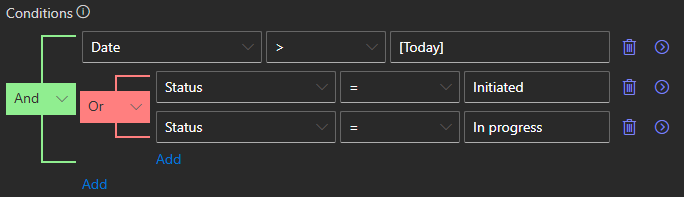
In the example above the conditions will be passed by an item with Date value greater than today and Status either Initiated or In progress. You can split any branch into multiple conditions by clicking on the arrow icon on the right.



