All on-premises components of Ultimate Forms install through a single unified installer. One tool adds, removes, or upgrades any licensed component and performs the full set of deployment commands across the farm: retracting and deploying WSP solutions, restarting the right services in the right order, activating features, copying resources to every server, and verifying application pools at the end. Separate per-component installers are no longer available, and that is a feature, not a limitation: one installer means one consistent deployment path, one version story, and none of the partial-installation states that used to generate support tickets. This article covers where to get the installer, what it automates, and why each step of its sequence exists.
If you administer SharePoint on-premises, ten minutes here will make every future Ultimate Forms deployment a known quantity.
One installer, every component
Ultimate Forms on-premises is a family of farm-deployed components, and historically that meant a choice between component-level installers and the consolidated "Infowise Ultimate Forms Enterprise" installer. The unified installer continues the consolidated approach as the only approach: it manages all licensed components from one interface, handling installation, upgrade, and removal alike.
The consolidation matters for reasons every farm administrator will recognize. Components that ship together are tested together, and installing them through one tool guarantees the versions on your farm actually belong together, rather than whatever mixture accumulated across years of individual updates. One tool also means one deployment procedure to document, one thing to run in the maintenance window, and one place to look when asking what is installed and at which version. The old failure mode, where component A was upgraded in March and component B never was, and the incompatibility surfaced in June as a mystery, is structurally eliminated.
Note the direct consequence: installing components with separate installers is no longer possible. If your internal runbooks still reference per-component setup files, this is the cycle to retire them.
Where to get it
The installer is available from two places. The first is the Infowise Capability dashboard in your Central Administration. The second, and the recommended path, is the Components page of the Ultimate Forms design interface:
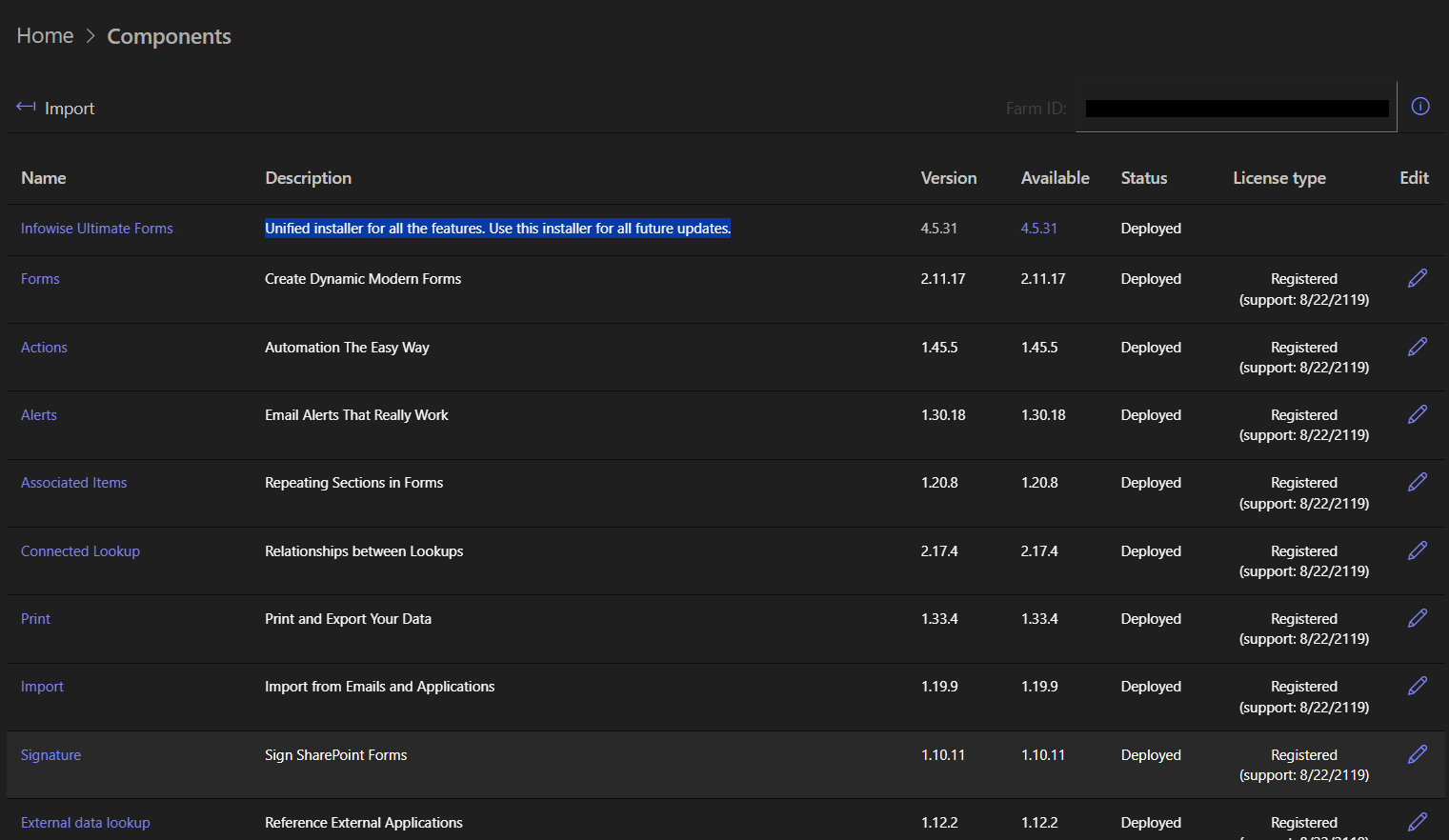
The recommendation is practical: the Components page shows the state of your installation alongside the download, so you see what is present, and at which version, in the same place you obtain what is missing. Detailed explanations of the wizard's installation steps are in the documentation; what follows is the anatomy, step by step, of what the installer does on your behalf.
The eleven steps, and why each exists
Anyone who has deployed WSP solutions by hand knows the deployment itself is the easy part; the ceremony around it, services, features, timers, resources, is where farms get hurt. The installer automates the whole ceremony in a deliberate order:
- Restart the SharePoint Administration and Timer services on all farm servers. Done first to prevent potential DLL locks: a service holding a loaded assembly can block the replacement of that assembly, and clearing the services before touching solutions removes the single most common cause of failed on-premises upgrades.
- Deactivate the relevant features at their respective levels, again to prevent locks, and to ensure nothing is executing component code while that code is being replaced.
- When removing or upgrading a component: retract the component's WSP solution, then remove the solution. Retraction before removal is the platform's own required order, and the installer never skips it.
- When installing or upgrading: add the WSP solution, deploy it, and register the product and version number. That registration is what makes the Components page an accurate inventory, and what support reads when you call.
- Enable the farm's "Allow service jobs" property, which several components need for their timer functionality, scheduled actions, alerts, and other background work.
- Restart the SharePoint Timer service again, this time so the timer executable loads the new versions of the component DLLs. Without this, background jobs would keep running old code until the next incidental restart, a subtle mismatch that is miserable to diagnose.
- Activate the relevant features, the counterpart to step 2, now that the new binaries are in place.
- Copy resources to all farm servers, so every web front end serves the same interface elements, regardless of which server a user lands on.
- Install the Infowise Ultimate Forms Extensions app on SharePoint 2019 and later, connecting the farm deployment to the modern app-based experience those versions support.
- Check the status of the farm's application pools, a final verification that the restarts and deployments left the farm serving.
- Finish.
Read as a whole, the sequence is a formalization of on-premises deployment best practice: quiesce, replace, re-enable, replicate, verify. Executed by hand, it is eleven opportunities for a skipped step on one server out of four; executed by the installer, it is a button.
Practical notes for the maintenance window
A few habits make installer runs uneventful. Schedule runs inside a maintenance window: the sequence restarts farm services, which briefly affects background processing, and while user impact is minimal, quiet hours are quieter. Run upgrades farm-wide when you run them at all, and let the installer's version registration be your source of truth for what is deployed. After the run, the installer has already checked the application pools, but it costs nothing to confirm your monitoring agrees. And keep the documentation walkthrough at hand the first time; after that, the process will be familiar enough not to need it.
Two planning links deserve a place in the same runbook. On-premises version lifecycles drive upgrade timing, and End of Support for SharePoint 2016 covers the horizon for the oldest supported platforms. And if your organization runs hybrid, remember the two environments install completely differently: SharePoint Online uses the Installation Wizard and app catalog with no farm deployment at all, while everything in this article is the on-premises story, where Ultimate Forms executes directly on your servers. Same product, two deployment worlds; the unified installer is the whole of the on-premises one.
Add your comment