One of the biggest challenges in SharePoint solution delivery is consistency. Organizations rarely deploy a solution just once. Instead, they roll it out across multiple sites, departments, regions, or even tenants. Over time, small differences in site structure, lists, libraries, or navigation can lead to fragmented solutions. The sites become harder to maintain, harder to support, and harder for users to adopt.
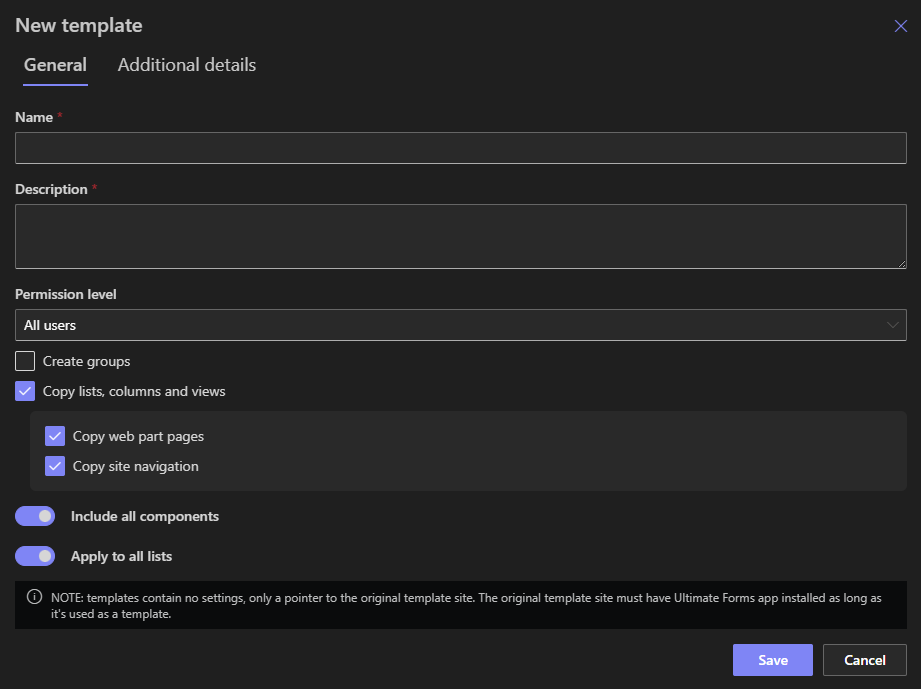
This is where the Template Manager in Infowise Ultimate Forms plays a critical role. Template Manager can synchronize site structure as part of a solution template. This ensures that sites remain aligned with the intended design. Quickly, reliably, and without manual rework.
Why Site Structure Consistency Matters in SharePoint
A complete SharePoint solution often includes:
-
Multiple lists and document libraries
-
Supporting pages
-
Navigation structure
-
Permissions and access patterns
- Forms, print templates, alerts, actions, etc.
When these elements are created manually or inconsistently, problems quickly emerge:
- Solutions drift away from their original design
-
Different sites based on the same initial design slowly diverge
-
Training becomes more difficult
-
Support teams deal with environment-specific issues
-
Updates take longer and introduce risk
Template Manager’s ability to sync site structure addresses these challenges directly by treating structure as part of the solution, not an afterthought.
What Does “Syncing Site Structure” Mean in Practice?
When a solution is packaged in Template Manager, the site structure itself becomes part of the template. This means that when the template is deployed or re-applied:
-
Required lists and libraries are created or aligned
-
Pages and structural elements are brought into place
-
Existing components are updated to match the template
-
Missing elements are restored automatically
Instead of building or fixing site structure manually, administrators can rely on a repeatable, predictable process.
Importantly, this synchronization is fast and configuration-driven. There is no custom scripting, no PowerShell dependency, and no need to rebuild sites from scratch.
Speed and Ease of Use: A Practical Advantage
One of the biggest benefits of Template Manager site structure sync is speed.
Tasks that traditionally take hours (or even days) can be completed in minutes:
-
Spinning up a new project site
-
Deploying a standardized departmental solution
-
Fixing a site that drifted from the standard layout
-
Rolling out updates across multiple sites (even in different tenants)
Because everything is driven by a predefined template, the process is repeatable and consistent every time.
From an ease-of-use perspective:
-
Administrators select the template
-
Choose the target site (blank or not)
-
Create sync the structure
No deep SharePoint expertise is required, which makes this especially valuable for teams that need to scale solutions quickly.
Real-World Example: Departmental Rollouts
A common scenario is rolling out the same solution across multiple departments, such as HR, Finance, or Operations.
The Challenge
Each department needs:
-
The same lists
-
The same pages
-
The same navigation
-
The same supporting structure
Manually creating or copying sites inevitably leads to differences. One site is missing a list, another has a renamed library, and a third has outdated pages.
How Template Manager Helps
By syncing site structure through Template Manager:
-
Every departmental site starts from the same blueprint
-
Updates can be re-applied later if the solution evolves
-
New departments can be onboarded in minutes
This ensures uniformity without slowing down deployment.
Real-World Example: Project-Based Site Creation
Project-driven organizations often create dozens or hundreds of project sites each year.
The Challenge
Project managers want sites that:
-
Follow a standard structure
-
Include predefined lists (tasks, risks, issues, approvals)
-
Provide consistent navigation and pages
Manual site setup becomes a bottleneck and introduces inconsistency.
How Template Manager Helps
A project site template can include:
-
Standard lists and libraries
-
Project dashboard pages
-
Navigation structure
Applying the template syncs the entire structure instantly. Project teams get a familiar environment, and IT avoids repetitive setup work.
Real-World Example: Multi-Region or Multi-Tenant Deployments
Organizations operating across regions or tenants face even greater complexity.
The Challenge
Each region or tenant must follow the same solution design, but manual deployment increases the risk of:
-
Configuration drift
-
Missed components
-
Inconsistent user experience
How Template Manager Helps
Template Manager allows integrators to:
-
Package the complete site structure once
-
Deploy it repeatedly across regions or tenants
-
Re-sync structure when updates are released
This dramatically simplifies global rollouts and ongoing maintenance.
Keeping Solutions Aligned Over Time
One of the most overlooked advantages of site structure sync is long-term maintenance.
SharePoint solutions are rarely static. Over time, organizations may:
-
Add new lists
-
Update pages
-
Adjust structure based on feedback
-
Standardize naming or navigation
Without a synchronization mechanism, these changes must be applied manually to every site.
With Template Manager:
-
The template is updated once
-
Sites are re-synced as needed
-
Structure stays aligned without rebuilding sites
This reduces technical debt and keeps environments manageable.
Reducing Risk and Human Error
Manual configuration always introduces risk. A missed step or accidental deletion can break a solution or confuse users.
Template-based structure sync:
-
Reduces reliance on manual steps
-
Eliminates guesswork
-
Ensures required components are always present
This is especially important in regulated environments where consistency and traceability matter.
Why This Matters for IT Managers and Integrators
For IT managers, Template Manager site structure sync supports:
-
Governance and standardization
-
Faster deployments
-
Easier support and troubleshooting
-
Reduced long-term maintenance effort
For integrators and consultants, it enables:
-
Repeatable solution delivery
-
Faster onboarding of new customers
-
Cleaner handovers
-
Predictable outcomes
For project managers and business analysts, it means:
-
Faster access to ready-to-use environments
-
Less waiting on technical setup
-
Consistent user experience across teams
A Foundation for Scalable SharePoint Solutions
SharePoint works best when it is treated as a platform, not a collection of one-off sites. Template Manager’s ability to sync site structure supports this mindset by making structure reusable, enforceable, and easy to maintain.
Instead of rebuilding solutions from scratch or fixing inconsistencies later, organizations can design once and deploy everywhere.
Conclusion
Template Manager’s site structure synchronization is a practical, proven capability that helps organizations scale SharePoint solutions without sacrificing consistency or speed. By packaging site structure as part of a solution template, teams can deploy, update, and maintain SharePoint environments with confidence.
Whether you are rolling out departmental solutions, managing project sites, supporting global deployments, or maintaining long-lived business applications, this approach saves time, reduces risk, and delivers a better experience for both administrators and end users.
Add your comment