Rethinking SharePoint Form Validation
Data validation is essential in every SharePoint form. The out-of-the-box SharePoint Validation is far too limited. Luckily Infowise Ultimate Forms provides a wide variety of easy to use options that take SharePoint form validation to the next level. In this article we will take a look at Real-Time Data Validation as an essential concept in modern SharePoint Forms. It's easy to set up and makes forms user friendly and elminates data errors and user frustration. Data validation is all about streamlining the user experience to make the experience intuitive and informative.
Basic SharePoint Validation is Outdated
Default validation typically involves a red asterisk to tell users that fields are required but no real-time feedback. A common experience is to fill out a large form, accidentally miss required information and then get blocked at form save. This is aggravating as it requires the user to scroll through the form to locate the missing fields. This often leads to users abandoning the form altogether. If this is a public facing form this will lead to lost sales or lost opportunities. We can do better. Luckily a better experience is easy to set up using Form Designer rules in Infowise Ultimate Forms.
Real-Time Validation Example
Real-time data validation shows the validation status of each field updating immediately as the user enters data. This involves a visual indicator of the field status in each field that will change as the user works their way through the form. In the below screen. The user can see that the first four fields are required due to the red asterisk AND the pink background color on each field. Note that you can also use a 1px solid red border if you prefer. Regardless - it is obvious what must be filled out.

Once the user begins filling out data, the form appearance changes immediately as data is entered. The pink background on each field disappears as the data is entered. This is visually reassuring to the user as they are getting confirmation that progress is being made in the form. Note also that in the below example, the next section is shown only after the first section is valid:
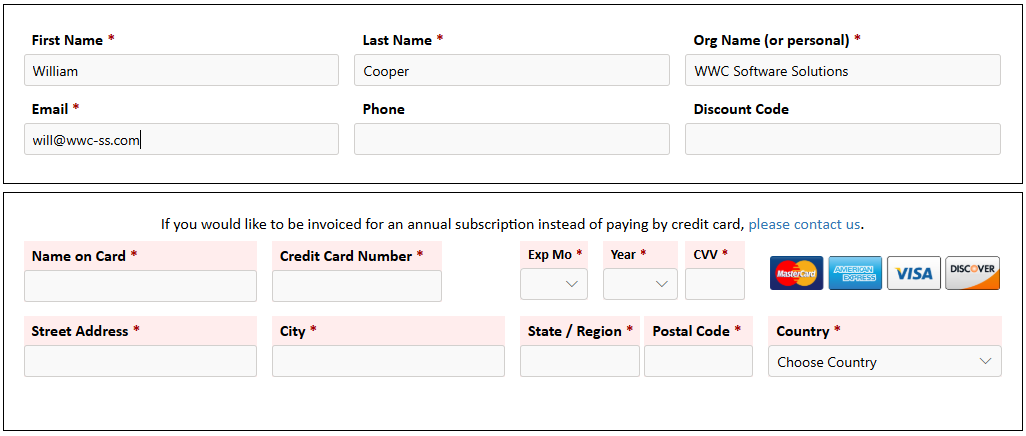
As the user continues to enter data, the fields with a pink background "turn off" real time making it crystal clear what remains on the form.
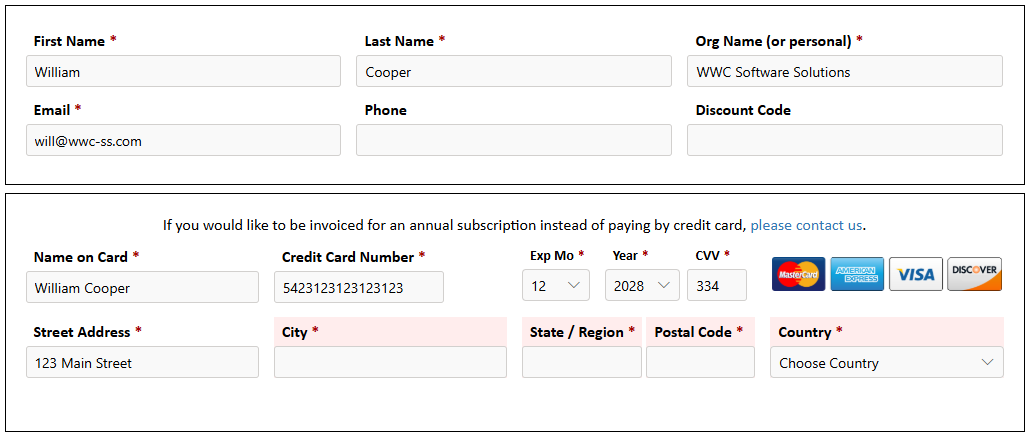
The net result is that the user will reach the end of the form having completed all of the required data.
Users will always be able to successfully submit the form at the end without any painful validation blocking.
Easy Process to Create Real-Time SharePoint Form Validation
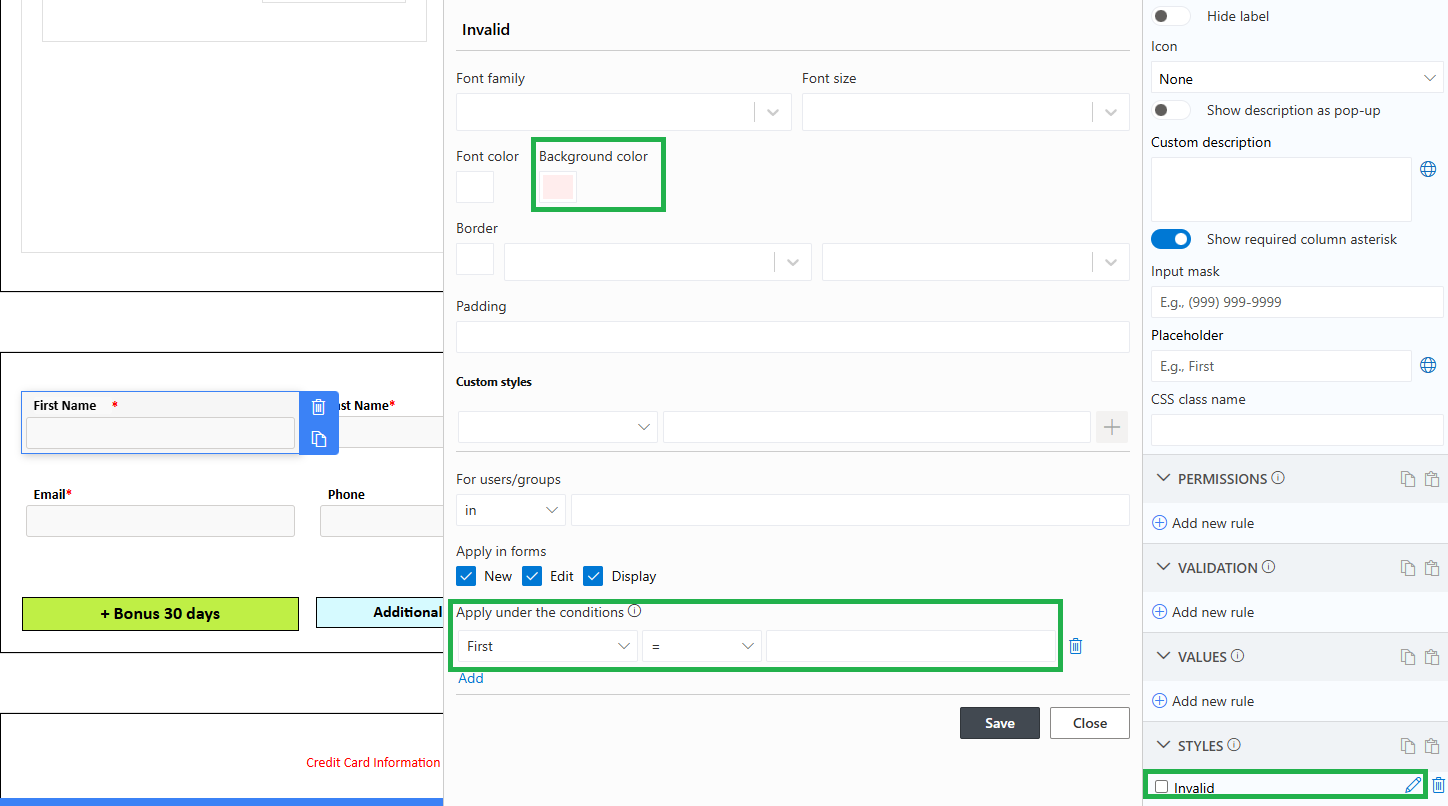
It takes very little to add this style of real-time validation. Just add a single style rule to each field as shown below. When the condition matches (in this case when the field is blank) a pink background is shown. As soon as the user begins typing in the field, the pink background disappears. This rule can be copied and pasted to all the other fields in the form that are required. The only part that needs to be changed is the condition at the bottom.
In most cases you can just use the condition when the field is blank.
Summary
Real-Time Data Validation can be easily layered into your existing SharePoint forms and delivers an immediate improvement to both user experience and data quality. Traditional SharePoint validation relies on users completing an entire form before discovering missing or invalid information at save time. This outdated approach creates frustration, slows users down, and often leads to form abandonment especially on longer or public-facing forms.
Real-time validation transforms the form into a guided, interactive experience. Required fields are clearly highlighted as soon as the form loads, and visual indicators update instantly as users enter data. As each field becomes valid, its warning styling disappears, giving users immediate feedback that their input is correct. This creates a sense of progress and confidence as users move through the form.
From a business perspective, this approach leads to cleaner data, fewer incomplete submissions, and less time spent correcting errors or following up with users for missing information. For public-facing forms, it can directly improve conversion rates by reducing friction and eliminating confusing validation failures at submission time.
With Infowise Ultimate Forms, implementing real-time validation is simple and requires only a basic style rule applied to each required field. No custom code is required, and the rule can be easily copied across multiple fields. The result is a modern, user-friendly form experience that aligns with today’s expectations for web forms.
By upgrading your validation approach, you turn form completion from a frustrating task into a smooth, intuitive process that users can complete confidently on their first attempt.
Add your comment