New Form Width Feature Added
Ultimate Forms uses responsive form design which means that the form adjusts according to the screen size automatically. Additionally you can now configure forms according to the amount of content needed. Sometimes forms can be very simple. You can now reduce the width of the form accordingly.
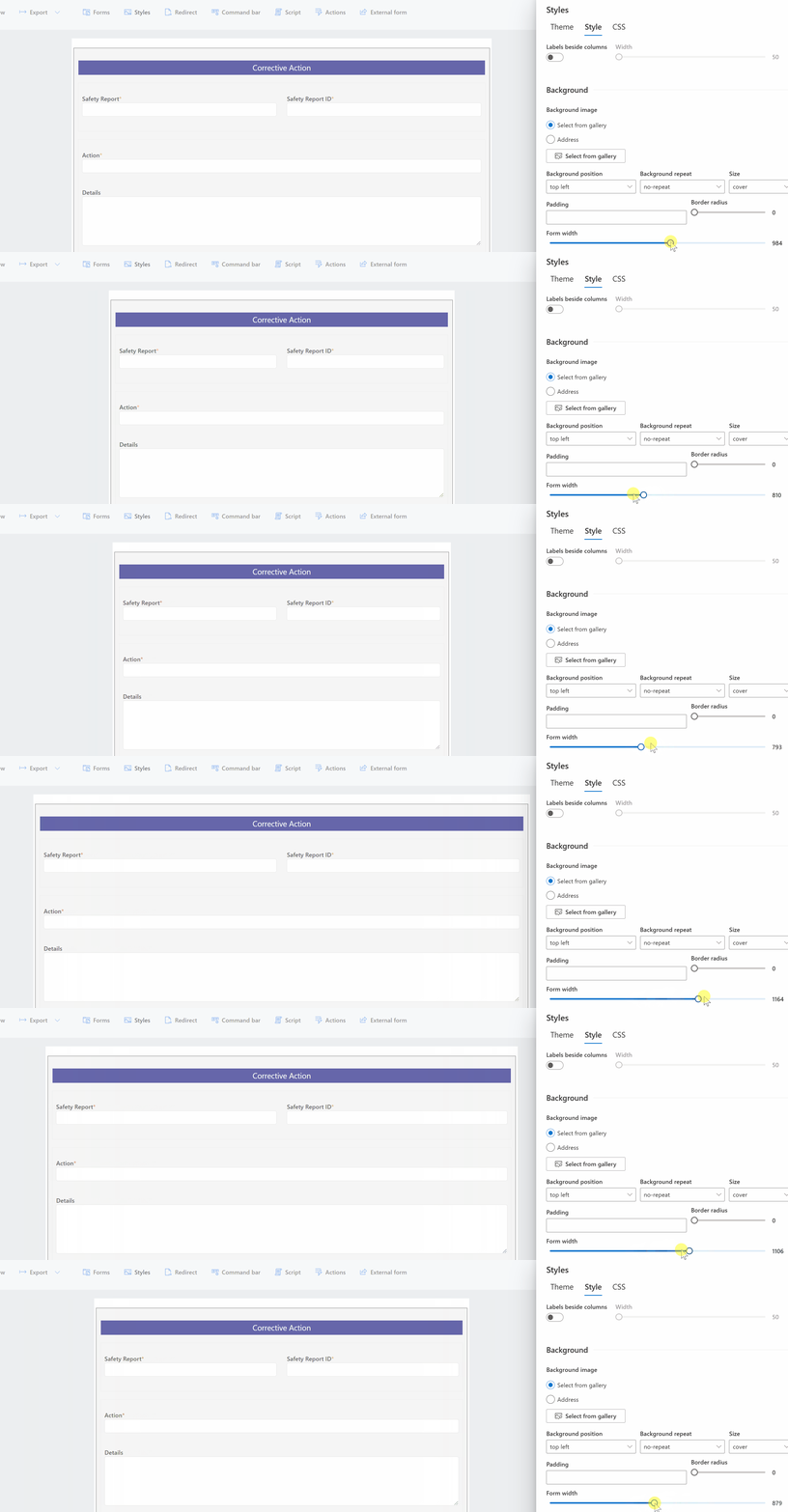
We've added a new Form width style setting which lets you set each form width with a simple slider.
The coolest part is that you can see it how it looks as you adjust:
The default form width is 1000px which suits most situations. On mobile devices this automatically will adjust down. Mobile phones will always show forms in a single column layout. The form width adjustment is specifically to adjust the form width on larger screens.
Here are a couple scenarios where you might like to adjust the width:
When there is a small number of fields use a small form
Sometimes forms collect only a small amount of information. When you have a small amount of fields, it isn't necessary to use the default 1000px form width. Try reducing it down to 600px width and using a simple 1 or 2 column form. You will you like the appearance better when the fields aren't so wide.
When there is a large number of fields use a large form
You can now set the width using the slider to as much as 1600px. When you have a lot of fields that you want them all in one form page, this will help. Maybe instead of a four column form you would like to do six columns? This might work a lot better for very full forms. For those "packed form" situations, give yourself some extra real estate.
Fluid Layouts Makes Adjustments Easy
The good thing is that you never have to worry about pixel perfect settings. The layout responds automatically. The modern form designer automatically adjusts the widths of all the fields in the containers dividing the measurements equally. The new Form width setting makes it as simple as possible to make adjustments.
Two Clicks Then Slide
The setting is easy to get to:
1) Click Styles on the command bar at the top.
2) Click the Style tab.
3) Slide the Form width control.
Try to break out of your habit of always using the default 1000px wide form. Enjoy this new feature and let us know if you have ideas for similar improvements.
Power to the Users
Easy form design in SharePoint isn't just about visual preferences. It's about empowering users, improving efficiency, and enabling rapid solution development without the need for complex code. The new Form Width feature added to Infowise Ultimate Forms is a perfect example of this philosophy in action. It represents a broader commitment to user-centric design, flexibility, and professional-grade customization all within the SharePoint platform.
At its core, Infowise Ultimate Forms is built to make form design accessible and intuitive. Whether you're a business analyst, a power user, or a seasoned SharePoint developer, the ability to quickly modify and configure forms means you can deliver powerful, tailored solutions to your organization in record time. The new Form Width setting is deceptively simple, yet it unlocks significant value for real-world scenarios.
Why does this matter? Because the layout and usability of your forms have a direct impact on user adoption and data quality. Forms that are too wide for their content look awkward and waste screen space. Forms that are too narrow for large volumes of data become frustrating to navigate. This feature solves both problems with a clean, responsive solution. Now, you can dynamically tailor your form width using a smooth slider interface—no custom CSS or complicated configuration required.
Responsive Design for the Win
Responsive design has long been a strength of Ultimate Forms, automatically adapting form layouts for different screen sizes, especially for mobile use. But desktop users - especially those using wide monitors or high-resolution screens can benefit from greater control. A 600px form for a simple 5-field request looks more elegant and compact. A 1600px form for a dense, multi-column intake process enables users to see all relevant fields at once without unnecessary scrolling. These adjustments enhance usability, reduce visual clutter, and increase productivity.
What sets Ultimate Forms apart is the fluid layout engine. When adjusting form width, all fields within each section reflow proportionally. This ensures a balanced look and feel across the form. There's no need to manually configure field widths or spacing—the platform does it for you, intelligently and automatically. You still retain full control when you need it, but you won’t be bogged down by tedious formatting.
Build Easy, Build Fast With No Code
Another reason this matters is speed of implementation. Traditional SharePoint customization typically requires a developer's touch including custom scripts, third-party tools, or extensive trial-and-error. With Ultimate Forms, you can design, publish, and adjust forms within minutes. Click, slide, save. It's that easy. This democratizes form design, enabling departments to build their own forms without IT bottlenecks.
The new Form Width feature is just one example of the many user-friendly innovations found at InfowiseSolutions.com. The platform includes a wide array of features such as:
-
Advanced Conditional Formatting
-
Repeating Sections
-
Dynamic Rules and Actions
-
Digital Signatures
-
Import and Export Tools
-
Email Alerts and Notifications
-
Charts and KPI Visuals
These features combine to deliver a complete no-code/low-code platform for building robust business applications in SharePoint. You can build anything from safety reporting systems to HR onboarding portals, without writing a single line of code.
Ultimately, features like adjustable form widths underscore a broader principle: SharePoint customization should be easy, powerful, and flexible. Infowise Ultimate Forms delivers on this promise, helping organizations move faster, adapt quicker, and get more from their Microsoft 365 investment.
If you're already using SharePoint and want to see how much better your solutions can be, visit infowisesolutions.com to explore the full feature set, view demos, and get started with a free trial. Small improvements like adjustable form width can have a huge impact on productivity and user satisfaction. Start building smarter forms today.
Add your comment